

The right wearable camera setup depends on what you want to capture. Travelers need an easy hands-free view, cyclists need a secure angle, and parents or pet owners often need to record while keeping both hands available.
Xtra ATTO gives you several ways to start without building a separate accessory kit. The following accessories are included in the box:
- Xtra ATTO Multifunctional Vision Dock
- Xtra ATTO Magnetic Hat Clip
- Xtra ATTO Magnetic Lanyard
- Xtra ATTO Protective Case
- USB-C to USB-C PD Cable (USB 3.1)
- Xtra ATTO Dual-Direction Magnetic Ball-Joint Adapter Mount
The core wearable mounts discussed below come with the camera, so you can try the Hat Clip, Magnetic Lanyard, and Ball-Joint Adapter without paying extra for these essentials.
For Travelers and Outdoor Explorers: Keep the Camera Easy to Reach
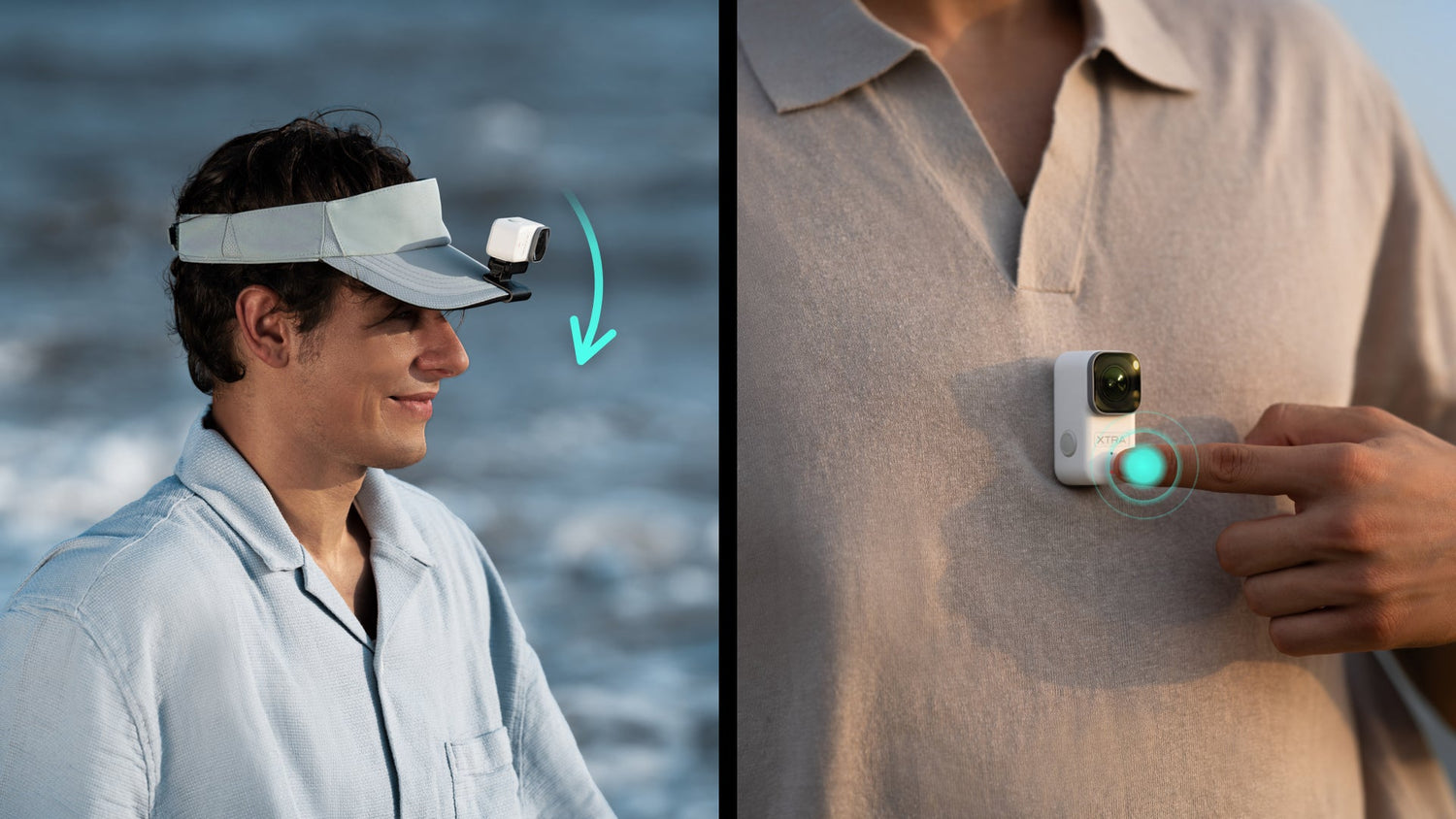
For city walks, markets, easy trails, and sightseeing, start with the Magnetic Lanyard. It creates a chest-level view while your hands remain available for luggage, maps, food, or hiking poles. Keep the lens clear of collars, hair, and backpack straps, and record a short walking test before a longer clip.
Choose the Magnetic Hat Clip when you want the camera to follow your line of sight. It works well for scenic walks, fishing, gardening, or demonstrations. Use a firm brim and do not treat the Hat Clip as an unverified helmet mount.
For a group shot or fixed landscape composition, connect the Ball-Joint Adapter to a compatible mini tripod or stable base and fine-tune the angle.
For Cyclists: Prioritize a Secure, Repeatable Position
Cyclists usually need a fixed, repeatable angle. The Ball-Joint Adapter can connect ATTO to a compatible bicycle mounting system and help adjust the camera direction.
Before riding, tighten every connection and complete a low-speed test in a controlled area. Make sure the camera and mount do not interfere with steering, braking, visibility, cables, or protective equipment. Never adjust the camera while moving.
A specialized bicycle mount may still be required, but the ATTO adapter is already included, so riders do not need to buy an additional proprietary adapter first.
For Everyday Creators: Choose the Setup You Will Actually Wear
For cooking, crafts, errands, and day-in-the-life videos, the Magnetic Lanyard is usually the simplest choice because it keeps both hands available.
The Hat Clip may provide a clearer view while gardening, assembling something, or demonstrating a hands-on process. Because head movement changes the frame, avoid quick, repeated turns.
Voice control, tap-to-record, nod-to-record, and Pre-Recording can reduce the need to reach for the camera. Test the selected trigger method with the current firmware and settings.
For Pet Owners: Start With the Human Perspective
The easiest pet setup is often to wear ATTO yourself. Use the Magnetic Lanyard during a walk or playtime to record without placing equipment on the animal.
For a lower fixed view, connect the Ball-Joint Adapter to a compatible mini tripod positioned safely away from paws.
A compatible pet-harness mount may create an animal-level POV, but it should be used only for short, supervised sessions. Use a properly fitted harness rather than a neck collar, and remove the setup if the pet freezes, scratches at the mount, changes its gait, or shows stress.
Although ATTO weighs 54 grams, the complete setup is not suitable for every animal.
For Parents and Families: Record Without Leaving the Moment
The Magnetic Lanyard provides an adult-worn view for family walks, cooking, playtime, and routines that require both hands.
Use the Ball-Joint Adapter with a compatible mini tripod when everyone should appear in the frame. The Multifunctional Vision Dock can help monitor and control a camera placed away from you.
The Rest of the In-Box Kit Supports the Whole Workflow
The Vision Dock supports monitoring, remote control, additional operating time, charging, and file export.
ATTO records to its built-in storage rather than directly to the microSD card in the dock. The card can be used to export files and free internal storage.
The Protective Case helps keep the camera separated from hard objects during transport, while the included USB-C cable supports charging and compatible high-speed transfer workflows.
Together, they make the kit easier to monitor, carry, recharge, and manage from day one.
Choose by Perspective, Not by Accessory Count
Travelers and everyday creators can begin with the Magnetic Lanyard. Users who want a higher first-person view can choose the Hat Clip. Cyclists and creators building fixed or specialized setups should begin with the Ball-Joint Adapter and a compatible activity-specific mount.
Because these accessories are included, you can test several perspectives before buying anything more specialized.
From August 1 through August 31, 2026, Xtra ATTO is available for $299. For anyone planning a late-summer trip, outdoor weekend, or new hands-free content routine, it is a convenient time to explore the camera and its complete in-box accessory kit.
Learn More About Xtra ATTO:Explore Xtra ATTO Product Details
Why Xtra ATTO Is the Wearable Camera Made for Real Life
XTRA ATTO: The Tiny Wearable Camera That Actually Fits Your Outdoor Life
Frequently Asked Questions
What is the battery life of Xtra ATTO?
The main camera offers up to 90 minutes of battery life. With the Multifunctional Vision Dock connected, total battery life can reach up to 220 minutes. Data is based on lab testing at 25°C, 1080p/24fps (16:9), with MotionMaster on, Wi-Fi off, and the screen off.
Is Xtra ATTO waterproof?
The main camera is waterproof up to 10 meters without a case. When used with the Multifunctional Vision Dock, the system provides IPX4 splash resistance. Please note that the Multifunctional Vision Dock alone is not waterproof.
Where are files stored on Xtra ATTO? Can it record directly to a microSD card?
Files are stored in the camera's built-in storage. Xtra ATTO does not support recording directly to the microSD card inside the Multifunctional Vision Dock. You can use the Vision Dock to quickly export files from the camera to a microSD card and free up internal storage.
Is it normal for Xtra ATTO to get warm or stop recording because of overheating?
Yes. Due to its compact, highly integrated design, Xtra ATTO may generate noticeable heat during high-resolution, high-frame-rate, or extended recording. This is normal.
The camera includes overheat protection and may stop recording when it reaches a safe temperature limit. For longer recording, we recommend using the camera in a well-ventilated environment, enabling Endurance Mode, lowering the bitrate, switching to 8-bit color, and setting the screen to turn off quickly.
Is XTRA ATTO available and supported in the United States?
Yes. Currently released XTRA products remain available for purchase in the United States. App features, firmware updates, customer service, and local support continue in full.
Does Xtra ATTO support voice control?
Yes. Xtra ATTO supports voice commands in English and Chinese. For best results, use voice control within 1 meter of the device in a quiet environment. English commands include Start Recording, Stop Recording, Take Photo, and Shut Down.
Does Xtra ATTO support slow motion?
Yes. Xtra ATTO supports up to 8x slow motion at 1080p/240fps, and 4x slow motion at 4K/120fps and 2.7K/120fps. Available settings may vary depending on the camera menu and firmware version.
What is included in the box besides the main camera?
Inside the Xtra ATTO box, you’ll find the following accessories:
- Xtra ATTO Multifunctional Vision Dock
- Xtra ATTO Magnetic Hat Clip
- Xtra ATTO Magnetic Lanyard
- Xtra ATTO Protective Case
- USB-C to USB-C PD Cable (USB 3.1)
- Xtra ATTO Dual-Direction Magnetic Ball-Joint Adapter Mount
These accessories are included and do not need to be purchased separately.
Does Xtra ATTO come with a warranty in the US?
Yes, Xtra ATTO includes an official 2-year US local warranty covering hardware defects and battery health.

Leave a comment
This site is protected by hCaptcha and the hCaptcha Privacy Policy and Terms of Service apply.