
The Ultimate Camera for DIY Creators: Documenting Your Projects Hands-Free
When you are deep into a project, your hands are full. You might be covered in sawdust, holding a soldering iron, or carefully prying off a stubborn vehicle window button. Trying to film this process with a smartphone usually means awkwardly propping it up against a coffee mug, only to realize in the editing room that you stepped entirely out of the frame during the most important part of the repair.
If you want to document your hobbies, build a YouTube tutorial channel, or share your weekend garage projects, you need a camera that works with you. Here is why the XTRA MUSE is the ultimate workbench companion for solo creators.
Smart Tracking: Your Invisible Camera Crew
• The Struggle: When you move around the workbench to grab a tool, a static phone camera leaves you out of the shot.
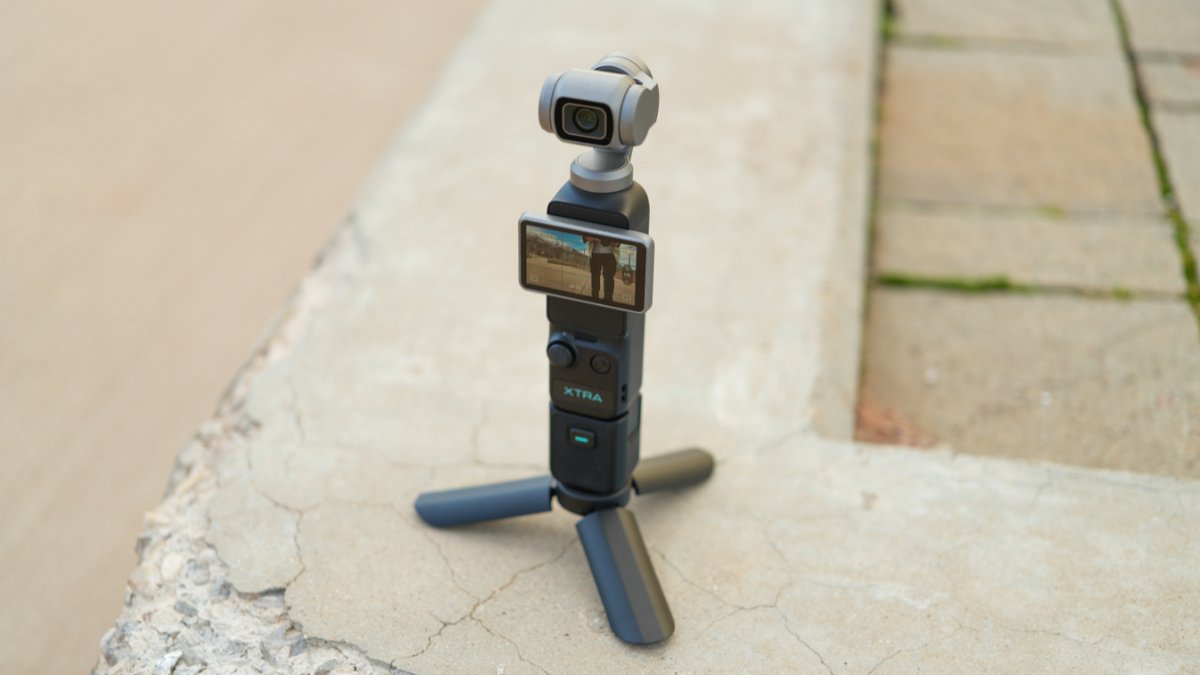
• The MUSE Solution: The built-in Smart Tracking acts as your personal camera operator. Simply set the MUSE on your bench, and the 3-axis mechanical gimbal will physically rotate to follow your movements, ensuring you and your project are always perfectly centered.
Fast Auto-Focus for Close-Up Details
• The Struggle: Showing viewers the tiny mechanical details—like how to unclip a specific wire or thread a needle—often results in a blurry, out-of-focus mess on a phone.
• The MUSE Solution: Engineered with full-pixel fast focusing, the MUSE instantly shifts focus from your face to the object you hold up to the lens. The transition is seamless and cinematic, making your tutorials incredibly clear and easy to follow.
Conquering Garage Lighting
• The Struggle: Garages, workshops, and basements notoriously have harsh or dim lighting that makes standard video look grainy and unprofessional.
• The MUSE Solution: Packing a massive 1-inch CMOS sensor, the MUSE pulls in significantly more light than a standard phone. It delivers crisp, clean, and vibrant 4K video regardless of your workspace lighting.
Zero "Greasy Screen" Syndrome
• The Struggle: You can't safely tap your expensive smartphone screen to adjust viewing angles when your hands are covered in grease, paint, or glue.
• The MUSE Solution: Once you set your tracking and hit record, the MUSE does the rest. You can work continuously without needing to stop, wipe your hands, and interact with a screen just to keep the camera pointed at you.
Elevate Your Creator Journey
Whether you are building custom furniture or filming a quick car repair tutorial, your audience deserves to see your craftsmanship clearly. The XTRA MUSE removes the friction of solo filming, letting you focus entirely on the build while it captures the cinematic B-roll.
👉 Discover XTRA MUSE for a pocket-sized camera that tells life-sized stories — shop now at the Official Store: https://store.xtra-us.com/products/xtra-muse
Why a Dedicated Camera Still Matters in 2026
Smartphone cameras have improved dramatically over the past few years, and for casual snapshots, they are perfectly adequate. But there is a ceiling to what a phone can deliver, and anyone who has tried to capture professional-looking video content with one knows exactly where that ceiling is: low light, fast motion, long recording sessions, and any situation where you need your hands free.
A dedicated camera solves these problems by design. It has a larger sensor for better image quality, purpose-built stabilization for smooth footage, and dedicated battery and storage so your phone stays charged and available for communication. Most importantly, a dedicated camera changes how you create. When you pick up a camera, you are making an intentional choice to document a moment. That intentionality shows in the final result.
XTRA MUSE is part of a new category of compact cameras that bridge the gap between phone convenience and professional quality. With a 1-inch CMOS sensor, 4K/120fps recording, and a mechanical 3-axis gimbal, it delivers image quality that rivals cameras costing significantly more — all in a package that fits in your jacket pocket.
Tips for Getting the Best Results With XTRA MUSE
Even though XTRA MUSE is designed to be point-and-shoot simple, a few techniques can help you get dramatically better results from every session:
- Use Smart Tracking for solo shots. Set the MUSE on any flat surface — a cafe table, a windowsill, a rock — and activate Smart Tracking. The 3-axis gimbal will physically rotate to keep you in frame as you move. This is the single most powerful feature for solo creators who want cinematic footage without a camera operator.
- Shoot in 4K/120fps for social content. 120 frames per second gives you 5x slow motion when played back at 24fps. This is perfect for creating eye-catching social media clips — hair flips, dance moves, water splashes, and any fast-action moment that benefits from dramatic slowdown.
- Take advantage of the twist-to-open design. The MUSE powers on when you twist the body open and powers off when you close it. This means you can go from pocket to recording in under two seconds, which is critical for capturing spontaneous moments that disappear quickly.
- Record in vertical mode for TikTok and Reels. The MUSE's rotatable screen and gimbal allow native vertical shooting without cropping. This means full-resolution vertical content for social platforms — no black bars, no quality loss.
Technical Specifications That Matter
Understanding the technical capabilities of your camera helps you make better creative decisions. Here is what the key specifications mean in practical terms:
- 1-inch CMOS sensor: This sensor size is approximately four times larger than the sensor in a typical smartphone. More surface area means more light gathering capability, which directly results in cleaner images in low light, better color accuracy, and a more cinematic shallow depth of field that separates your subject from the background.
- 4K/120fps recording: 4K resolution provides four times the detail of 1080p. 120fps enables 5x slow motion. Together, these give you footage that holds up on large screens and social media alike, with the creative flexibility to slow down any moment for dramatic effect.
- 3-axis mechanical gimbal: Unlike digital stabilization, a physical gimbal uses motors and sensors to counteract camera shake in real time. This produces genuinely smooth footage without cropping the image or introducing compression artifacts. The difference is immediately visible, especially during walking shots, tracking movements, and any handheld recording situation.
- Smart Tracking with auto-framing: The gimbal can lock onto a subject and physically rotate the camera head to keep them centered in the frame. This is equivalent to having a dedicated camera operator, and it works reliably in most lighting conditions.
Real-World Workshop Filming: What to Expect
Filming in a workshop, garage, or craft room presents unique challenges. Lighting is often harsh fluorescent or dim task lighting. Your hands are occupied with tools and materials. The work surface is cluttered with supplies. And the best moments — the ones where a technique clicks, a tool makes a perfect cut, or a project comes together — happen quickly and unpredictably.
Smart Tracking is transformative in this environment. Set the camera on a shelf or workbench, activate tracking, and the gimbal will follow your movements as you move around your workspace. You get professional-looking footage without a camera operator, and both your hands stay focused on the project. When you need close-up detail shots, the fast auto-focus system shifts seamlessly from your face to the object you hold up to the lens, making tutorials clear and easy to follow.
Final Thoughts
The gap between phone footage and dedicated camera footage is not subtle — it is immediately visible to anyone watching your content. The XTRA MUSE brings a 1-inch sensor, mechanical gimbal stabilization, and 4K/120fps recording into a pocket-sized package that costs significantly less than cameras with comparable specifications.
Whether you are a seasoned content creator or someone who simply wants their memories to look better than what a phone can produce, XTRA MUSE is designed to meet you where you are and grow with you as your skills develop.
XTRA MUSE is available now at the XTRA Official Store with free shipping on orders over $99 and a 2-year warranty included.
Getting Started With Compact Camera Content Creation
If you are new to dedicated camera content creation, here is a practical roadmap that will take you from unboxing to your first published video in under an hour:
- Charge fully before your first session. A full charge ensures you can shoot without interruption during your first experience with the camera. This matters because your first impressions of image quality and handling will shape how motivated you are to keep using it.
- Start with what you know. Do not try to create a cinematic masterpiece on day one. Film your morning routine, your walk to work, your pet doing something cute. Familiar subjects let you focus on learning the camera's controls and features without the pressure of capturing something extraordinary.
- Review your footage the same day. Watching your footage immediately after shooting helps you connect cause and effect — "Oh, that looked great because I held the camera at chest level" or "That was shaky because I was walking too fast." This feedback loop accelerates your learning dramatically.
- Post your first clip within 48 hours. The longer you wait to share your first piece of content, the more pressure you put on yourself to make it perfect. Sharing early builds confidence and generates feedback that helps you improve faster than practicing in isolation.
Content creation is a skill that develops through consistent practice. A compact camera that is easy to carry and quick to use removes the friction between wanting to create and actually creating. The camera handles the technical quality — you focus on the creative vision.
What Sets XTRA MUSE Apart From Other Pocket Cameras
The pocket camera category has become crowded with options, but XTRA MUSE differentiates itself in several meaningful ways that matter to everyday creators:
- Integrated gimbal, not a separate accessory. Most pocket cameras require you to buy a separate gimbal for stabilized footage — an additional cost of $100-300 and an extra piece of equipment to carry. XTRA MUSE builds the gimbal directly into the camera body, which means stabilization is always available without any setup or additional cost.
- 1-inch sensor at this price point. The 1-inch CMOS sensor is the same sensor size used in premium compact cameras from Sony, Canon, and DJI that cost $700-1200. Having this sensor quality in a device under $400 represents exceptional value for creators who want professional image quality without professional pricing.
- Smart Tracking as a standard feature. AI-powered subject tracking is typically reserved for high-end cameras or requires a companion app. XTRA MUSE includes on-device Smart Tracking that works immediately, without any configuration, and tracks reliably in most real-world conditions.
- Vertical shooting without cropping. Most cameras shoot horizontally and require you to crop the footage for vertical social platforms, losing resolution in the process. XTRA MUSE shoots natively in both orientations, preserving full resolution for every platform.
These features combine to create a camera that genuinely replaces a phone for video content creation — not through marketing claims, but through practical capabilities that produce visibly better results from the very first recording.

Leave a comment
This site is protected by hCaptcha and the hCaptcha Privacy Policy and Terms of Service apply.