

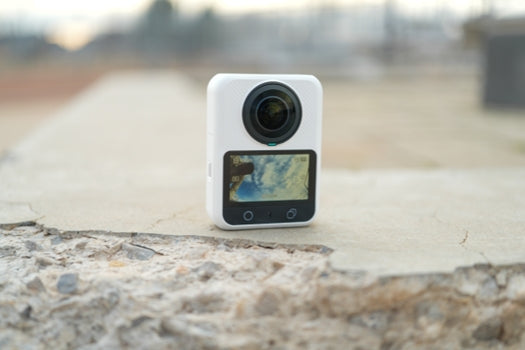
An affordable 360 camera should lower the cost of creating finished videos, not simply carry the lowest price on the shelf. The camera is only one part of the purchase. Storage, mounting, lens protection, power, editing software, and the device used to process the footage can all change the real cost.
This guide shows how to compare the complete setup. It also explains which features are worth paying for and where a first-time buyer can save without making the camera difficult to use.
Define the Video You Want to Make
Start with the finished video. A traveler who wants short vertical clips has different needs from a cyclist who plans long mounted rides or a real-estate creator who needs detailed panoramic photos.
Ask four questions before comparing prices.
- Will you publish standard flat video, interactive 360 video, panoramic photos, or a mix?
- Do you need to reframe one recording for both horizontal and vertical platforms?
- Will the camera be handheld, placed on a tripod, or mounted on a moving vehicle?
- Can your phone or computer import, preview, and export the camera's files?
These answers determine which costs are necessary. They also prevent you from paying for accessories or recording modes that do not support your actual workflow.
Compare the Complete Kit Cost
The useful comparison is camera plus everything required for the first month of filming. Build the total around the following categories.
Camera and Included Storage
High-resolution 360 footage creates large files. If a camera requires a memory card before it can record, include a compatible card in the initial price. If it includes built-in storage, confirm how much space is usable and whether the camera also accepts a microSD card.
Built-in storage can remove one immediate purchase and provide a backup when a card is missing or full. Expansion still matters for longer trips. The goal is not the largest number. It is a storage plan that matches the length and resolution of your normal sessions.
Selfie Stick Tripod and Mounts
A narrow selfie stick is useful because it can sit close to the stitch line and become less visible in a reframed shot. A small tripod supports static scenes, group shots, and indoor filming. Motion use requires activity-specific hardware that is rated for the load and installed according to the mount maker's instructions.
Check the camera interface before buying accessories. A standard 1/4-inch thread improves compatibility, while a quick-release system can make position changes faster. Do not assume that every action-camera cage, extension arm, adhesive base, or waterproof accessory fits every 360 camera.
Lens Protection
Both fisheye lenses remain exposed to the scene. A scratch can appear in every angle and may be difficult to hide after recording. A lens cap for storage and an approved protector for active use are usually more valuable than decorative accessories.
Protection can also affect stitching and flare, so test the exact protector under the conditions you plan to film. Saving money by leaving the lenses unprotected may create a much larger replacement cost later.
Power and Charging
Do not buy several spare batteries before learning how you record. A creator who captures short chapters may need less power than someone who records a continuous ride or event. Start with the supplied battery, test a typical session, and add a spare only when the result shows a real gap.
If the camera can record while connected to power, check the manufacturer's heat guidance. External power is not a reason to ignore temperature alerts or airflow.
Editing Software and Hardware
The least expensive camera can become the wrong purchase if its footage is slow to transfer or difficult to reframe on the device you already own. Before buying, download a sample original file when one is available and test the intended editor.
Check import time, preview smoothness, keyframing, stabilization, export formats, and available storage on the editing device. Include any required software subscription, cloud storage, external drive, or computer upgrade in the budget. Free software is valuable only when it completes the workflow you need.
Spend More on the Parts That Protect the Final Result
The following capabilities usually deserve priority in an affordable 360 camera.
- Enough panoramic capture resolution for the reframed view you plan to export. An 8K spherical master does not become an 8K flat crop because the final frame uses only part of the sphere.
- Reliable storage and a clear file-transfer routine. A high-resolution camera is not useful if recording stops or files cannot be organized.
- Secure mounting and lens protection. Stable positioning and clean lenses affect every shot.
- An editing path that works on your phone or computer. Reframing is part of the product experience, not an optional extra.
- Useful exposure and color controls for the conditions you actually film. Advanced color modes only add value when you intend to grade the footage.
Save on Extras That Do Not Support Your First Shoots
New buyers often overspend on large accessory bundles. Begin with one safe mounting method, one compact support, lens protection, and enough storage for a normal session. Add specialized gear after you know what is missing.
You can often postpone these purchases.
- Multiple extension arms when one straight selfie stick covers the planned shot
- Several batteries before testing real session length
- Large filter kits without a clear exposure problem to solve
- Premium editing subscriptions before testing the included or free tools
- A second mount for a scene you have not planned to film
Saving in these areas keeps the budget focused on image capture, file reliability, and lens safety.
Where XTRA 360 Fits
XTRA 360 combines 8K 360 capture with 105GB of usable built-in storage and microSD expansion. For a value-focused buyer, that storage design can reduce the need for an immediate card purchase while leaving room to expand later. The camera also includes a 1/4-inch thread and a magnetic quick-release base, which support a practical starter kit built around compatible mounting hardware.
Xtra 360 is an XTRA product. This article uses manufacturer specifications and current store listings and does not present an independent laboratory test.
The camera's 8K capture provides source detail for reframing, but the final flat-video resolution depends on the selected field of view, crop, and export settings. Buyers should test a short original file on the phone or computer they plan to use. Editing speed and software preference can matter as much as the camera specification.
XTRA 360 also supports 10-bit X-Log for creators who already use a color-grading workflow. That feature is worth paying for only when the editor, display, and publishing process can preserve the benefit. A beginner who wants quick social clips may get more value from storage, mounting simplicity, and lens protection.
Use This Buying Checklist
Before placing an order, write down the complete cost for your own setup.
- Confirm the camera price and the exact contents of the selected bundle.
- Add only the storage required for your first planned session.
- Choose one compatible selfie stick, tripod, or activity-specific mount.
- Include a lens cap and any approved protection needed for the environment.
- Test the intended editing software and one original sample file.
- Add power accessories only after estimating or testing session length.
- Confirm warranty, return terms, and replacement-part availability.
This list makes two similarly priced cameras easier to compare. One may cost less at checkout but require more purchases before the first usable shoot.
Who Should Choose a Value Focused 360 Camera
An affordable 360 camera is a good fit when you want to experiment with reframing, capture travel or outdoor scenes from one position, and create several viewpoints from one recording. It can also be a sensible secondary camera when a fixed-lens action camera or phone already covers direct-to-camera shots.
Choose a different category when you mainly record handheld talking videos and want mechanical stabilization, or when you only need a forward-facing rugged camera with minimal post-production. The lower total cost comes from buying the camera type that matches the job.
Make the Purchase Around the Workflow
The best budget decision protects the capture, storage, and editing steps that turn footage into a finished video. Compare the complete kit, test the editing path, and delay accessories that do not solve an immediate problem.
If XTRA 360 matches that checklist, review the current camera, available kits, and confirmed specifications at the official XTRA 360 product page.


Leave a comment
This site is protected by hCaptcha and the hCaptcha Privacy Policy and Terms of Service apply.