

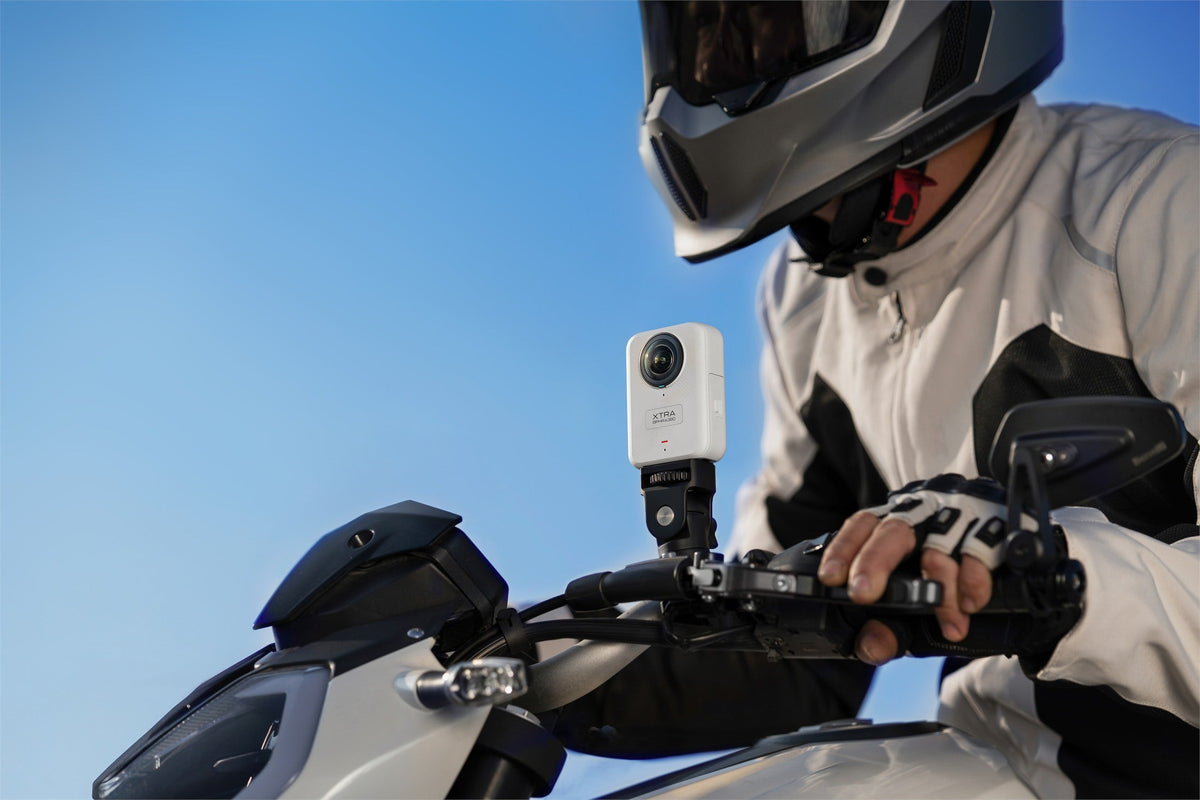
The best 360 camera for travel and solo vlogging should make unpredictable moments easier to capture without turning every day into a production. Look for dependable panoramic quality, practical storage and power, a secure mounting system, and a reframing workflow you can finish on the devices you bring.
A 360 camera is especially useful when you travel alone because one recording can include you, the destination, and activity around you. It is not automatically the best choice for every vlog. If you want a finished forward-facing clip with almost no post-production, a conventional action camera or pocket gimbal may be simpler.
Start with the video you want to publish
Think about the final shot before comparing specifications. A solo traveler may want a walking introduction, an outside view of a bicycle, a group moment without asking a stranger to film, or both vertical and horizontal edits from the same scene.
A 360 camera records the surrounding sphere, so you can choose the viewing direction later. That flexibility helps when you cannot monitor framing or when something interesting happens behind you. It also adds work: the footage must be imported, stitched, reframed, and exported before it becomes an ordinary video for social platforms.
Panoramic capture is most valuable for rides, landscapes, groups, and changing action. For mostly face-to-camera videos, check audio and editing effort as carefully as image quality.
Judge image quality after reframing
An 8K label on a 360 camera describes the full panoramic frame. A horizontal or vertical view selected from that sphere uses only part of the captured pixels. A high-resolution export cannot recreate detail that was not present in the selected area.
Compare sample footage at the framing you actually plan to use. A wide view of you and a landmark is less demanding than a tight crop of a distant face. Look for stitching around people and nearby objects, detail in bright skies and shaded streets, and motion clarity while walking or riding.
For a deeper explanation, read our guide to 8K 360 resolution and reframing.
Prioritize storage and a realistic power plan
Panoramic files are large. Built-in storage can save a day when a memory card is missing or full, while card expansion can support longer trips. Neither is a backup. Copy important footage to another device before clearing the camera, and confirm that your phone, tablet, or computer has enough room for both source files and exports.
Published battery figures are measured under specific settings and temperatures. Screen use, wireless transfers, repeated playback, cold weather, and high-resolution recording can shorten actual runtime. Record selected moments instead of leaving the camera running all day, and plan charging or spare power around the itinerary.
Choose mounts for solo filming, not just for the bag
For solo travel, a selfie stick is often both the support and the camera operator. A well-aligned invisible stick can create an outside view that includes you and the environment. A compact tripod can help with a stationary introduction, but it must be stable, permitted, and placed where it will not block a walkway.
Check thread, quick-release, and accessory compatibility before departure. A secure mount you will actually use is more valuable than a bag of untested adapters.
Keep people and other important subjects away from the lens join when possible. XTRA recommends at least 0.7 meters between XTRA 360 and a subject as a starting point for more natural stitching. Close faces, hands, handlebars, and backpack straps deserve a test from the final viewing angle.
Stabilization helps, but mounting still matters
Electronic stabilization and horizon leveling can make a walk or ride easier to watch, but they cannot fix a loose mount, dirty lens, severe vibration, or low-light motion blur. Test the exact position: a chest mount may block much of the rear view, a helmet follows every head turn, and a long pole adds leverage and clearance risks.
Check low-light performance in motion
Evening streets, indoor markets, and stations combine low light with motion. A brighter processed image is not automatically sharper: slower shutter speeds can blur people, while stronger noise reduction can soften detail. Review moving subjects, start with automatic exposure, and record a short test in the real location rather than relying on one universal night setting.
Protect two lenses and plan for weather
A 360 camera has two exposed lens surfaces. A fingerprint, raindrop, or scratch on either side can affect a large part of the scene. Carry a lens cap and suitable cleaning material, and inspect both lenses before an important location or after putting the camera in a pocket or bag.
Waterproof depth and underwater image quality are separate questions. XTRA 360 is rated IP68 to 10 meters with its covers fully sealed, but XTRA cautions that direct underwater use can create distortion and stitching errors because fisheye lenses behave differently in water. Salt, sand, unknown liquids, and damaged seals also require careful handling. Follow the current instructions, rinse appropriately after exposure, and dry the camera before opening a compartment.
Treat editing as part of the buying decision
The value of shoot-first, frame-later depends on whether you can complete the workflow. Before a major trip, import one representative clip, choose a view, add keyframes if needed, and export both a horizontal and vertical version. Check the result on the phone or computer you will actually carry.
Do not assume that every editor can interpret an original panoramic file. A stitched 360 file, a project that still supports reframing, and an exported flat video are different deliverables. Confirm current software support, file formats, and export limits before relying on a third-party app.
Our multi-platform 360 editing guide explains how to preserve a master recording and create separate YouTube, Reels, and Shorts versions without treating one crop as suitable for every platform.
Where XTRA 360 fits
XTRA 360 is an XTRA product. This guide uses manufacturer specifications and practical selection criteria; it does not report an independent travel-camera test.
XTRA lists panoramic recording up to 8K/50fps, 100MP panoramic photos, 360 Lock stabilization, an invisible selfie stick function, and about 105GB of usable built-in storage. Single-lens recording is listed separately at up to 5K/60fps. The 181-gram body is rated to 10 meters with the stated sealing requirements. This package suits travelers who value flexible framing and onboard storage, but not someone who expects every recording to become a finished vlog automatically.
Match the camera type to your trip
Choose a 360 camera when
You travel alone and want yourself and the destination in the same recording.
The most interesting direction is hard to predict while recording.
You want horizontal and vertical views from selected moments.
You are willing to import, reframe, review, and export the footage.
Choose a conventional action camera when
You mainly need a forward-facing POV or a finished wide-angle clip.
You prefer a smaller file and a shorter editing path.
A specific helmet, chest, or vehicle view matters more than choosing the angle later.
Choose a pocket gimbal camera when
Your priority is smooth handheld walking footage and face-to-camera presentation.
You want to compose the final view while filming rather than after the trip.
Water, impact, and hands-free mounting are not the main requirements.
A practical travel checklist
Record and export a full test clip before departure.
Confirm available storage on the camera and editing device.
Pack a lens cap, cleaning supplies, charging cable, and only the mounts you will use.
Check local rules for sticks, tripods, helmets, vehicles, museums, and crowded attractions.
Back up important footage before formatting a card or clearing internal storage.
Inspect both lenses and every mount at the start of each day.
The bottom line
The best 360 camera for travel and solo vlogging is the one that makes missed angles less likely without creating an editing process you will abandon. Compare reframed detail, storage, power, mounts, lens care, and software on the equipment you already own. Then test the entire path from recording to a finished post before the trip begins.
If panoramic capture, onboard storage, and flexible solo framing match your plans, explore XTRA 360 and its current kit options.

Leave a comment
This site is protected by hCaptcha and the hCaptcha Privacy Policy and Terms of Service apply.