

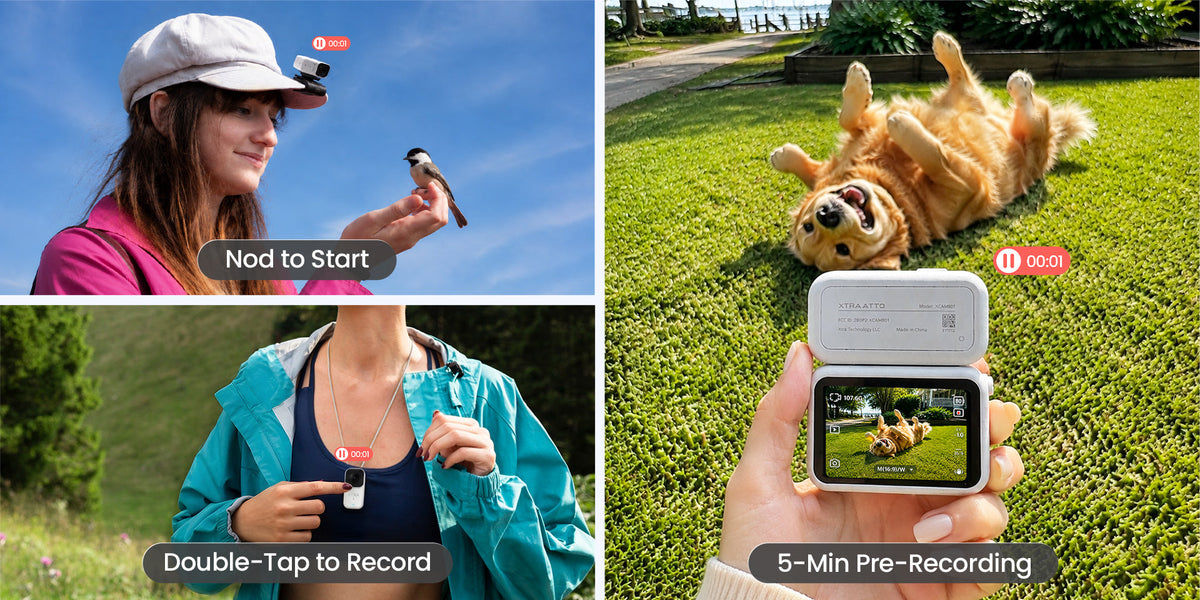
A wearable POV camera can make viewers feel like they are inside the moment.
But simply wearing a camera does not automatically make the footage immersive.
POV video can quickly become hard to watch if the horizon moves too much, every clip looks the same, or the camera angle does not match what is actually happening.
The good news is that better POV usually comes from a few simple choices—not from making the setup more complicated.
Here are seven ways to make wearable first-person footage feel more natural, intentional, and watchable.
1. Choose the POV That Matches the Story
The best camera position depends on what you want viewers to experience.
Chest POV
Best when your hands are part of the story:
-
Cooking
-
Fishing
-
DIY
-
Pet interaction
-
Camping
-
Crafts
Hat POV
Best when where you are looking matters:
-
Hiking
-
Walking
-
Travel
-
Outdoor exploration
Fixed or Low POV
Best when the perspective itself is interesting:
-
Pets
-
RC models
-
Sports
-
Creative product shots
-
Floor-level action
A simple rule:
Hands are the story → Chest POV
Where you look is the story → Hat POV
The angle is the story → Fixed POV
Do not choose a mount just because it is available. Choose it because it helps explain the moment.
2. Keep the Horizon Easy to Read
One of the fastest ways to make POV footage uncomfortable is a horizon that constantly tilts or drifts.
This is especially noticeable when walking, hiking, cycling, or turning quickly.
Stabilization and horizon-control features can help, but your body movement still matters.
Try to avoid unnecessary rapid head turns and exaggerated movements when the camera is mounted high.
Xtra ATTO, for example, uses MotionMaster stabilization and TiltGuard horizon leveling, with additional Horizon Correction options available for supported shooting modes.
The goal is not perfectly static footage.
POV should still feel alive.
It just should not make the viewer work too hard to understand where the frame is going.
3. Let Your Hands Enter the Frame
First-person footage becomes more immersive when viewers can see the activity—not only the environment.
That is why chest POV often works so well.
Instead of filming only a trail, show your hands adjusting your backpack.
Instead of filming only your pet, show both hands playing with them.
Instead of filming only the campsite, show yourself building it.
Hands give the viewer context.
They answer:
“What am I doing right now?”
For hands-free POV, this is often more valuable than simply making the field of view as wide as possible.
4. Do Not Make Every Clip Too Long
POV footage can become repetitive surprisingly quickly.
A five-minute walk may feel interesting to the person who experienced it—but viewers may only need five seconds to understand the scene.
Try capturing shorter moments with a clear purpose:
Start walking → interesting section → action → reaction → next perspective
For short-form content, a sequence of several focused POV clips is often easier to watch than one long continuous take.
You can still record longer footage when the moment requires it.
But during editing, ask:
Does this clip show something new?
If not, trim it.
5. Mix Wearable POV With Other Angles
Even a great wearable POV camera does not need to record the entire video.
Mixing perspectives makes first-person footage more effective.
For example, a hiking Reel could use:
Hat POV — walking the trail → Chest POV — climbing or using trekking poles → Fixed shot — walking into frame → POV — reaching the viewpoint → Traditional shot — final scenery
A pet video could be used:
Chest POV — playtime → Low POV — pet running toward the camera → Close fixed angle — nose or paw → Owner reaction
The wearable footage becomes part of the story rather than the only visual language in the video.
6. Use Wide FOV With Intention
A wider field of view helps show more of the environment around the wearer.
That is useful for:
-
Trails
-
Travel
-
Cycling
-
Outdoor activities
-
Hands-on POV
-
Pet interaction
But the widest possible view is not always the most natural-looking one.
Very wide perspectives can make subjects near the edge of the frame appear more distorted.
Xtra ATTO offers a 143° wide field of view and also supports a Nature wide FOV, designed to maintain a wide perspective while reducing visible distortion.
Think about what matters more in the shot:
maximum context or a more natural-looking perspective.
The answer can change from scene to scene.
7. Use Pre-Recording for Moments You Cannot Predict
Some of the best POV footage is impossible to schedule.
A dog suddenly runs toward you.
A fish bites.
Wildlife appears.
Your friend reacts to something unexpected.
A trail opens into a view faster than you expected.
In those situations, better POV is not only about camera position.
It is about being ready.
Xtra ATTO supports up to five minutes of pre-recording, helping preserve footage from before the record command when the feature is active.
That can be especially useful for:
-
Pets
-
Fishing
-
Outdoor activities
-
Family moments
-
Sports
-
Travel
You do not need to record everything continuously.
Sometimes the better solution is simply having a little more room to react late.
What Makes Wearable POV Feel Good to Watch?
A good first-person video usually has three things:
A clear perspective
The viewer quickly understands where the camera is and what they are seeing.
Useful movement
The camera moves because the activity moves—not because the person filming is constantly looking around.
A reason for the angle
Chest POV shows hands.
Hat POV shows direction.
Low POV reveals a perspective viewers would not normally see.
That is what turns wearable-camera footage from a technical demo into a story.
Where Xtra ATTO Fits
Xtra ATTO is designed around flexible wearable POV capture.
Its 54g camera body, magnetic mounting options, 4K/60fps recording, stabilization, 143° FOV, Nature wide option, and five-minute pre-recording support different first-person shooting styles.
But the camera is only part of the result.
The bigger difference comes from deciding:
Where should the viewer be?
On your chest?
At eye level?
Near the ground?
Inside the action?
Once you answer that question, better POV becomes much easier to create.


Leave a comment
This site is protected by hCaptcha and the hCaptcha Privacy Policy and Terms of Service apply.